[HarmonyOS][K老师]实现华为账号登录(Account Kit)集成功能的详细步骤。
原创
 K老师 2026-01-15 14:36:22 发布
106 浏览 0 点赞 0 收藏
一、开发准备全流程
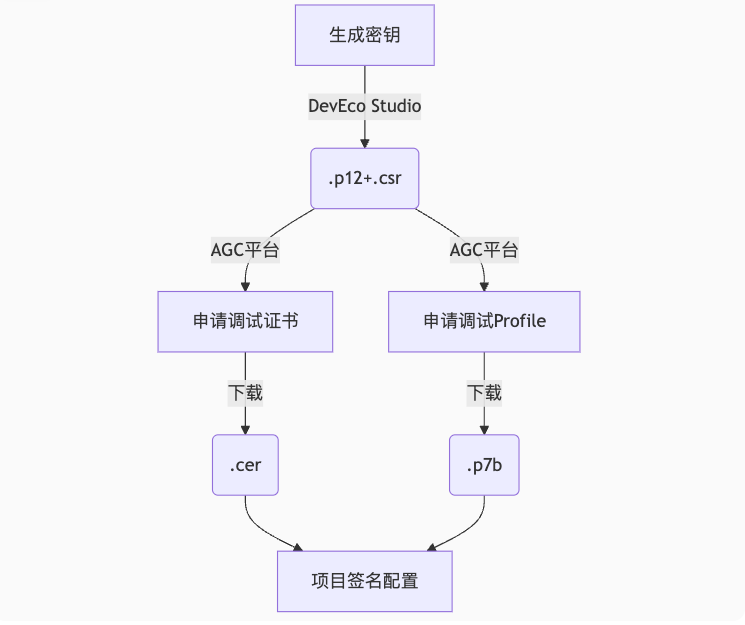
1. 证书配置四步法
2. 关键配置项
| 文件类型 | 作用 | 获取方式 |
|---|---|---|
| .p12 | 私钥文件 | DevEco Studio生成 |
| .csr | 证书请求文件 | DevEco Studio生成 |
| .cer | 调试证书 | AGC平台申请 |
| .p7b | Profile文件 | AGC平台申请 |
签名配置示例:
// build-profile.json5
"signingConfigs": [
  {
    "name": "release",
    "material": {
      "storeFile": "meikou.p12",
      "storePassword": "******",
      "keyAlias": "meikou",
      "keyPassword": "******",
      "signAlg": "SHA256withECDSA",
      "profile": "meikou_debug.p7b",
      "certpath": "meikou.cer"
    }
  }
]
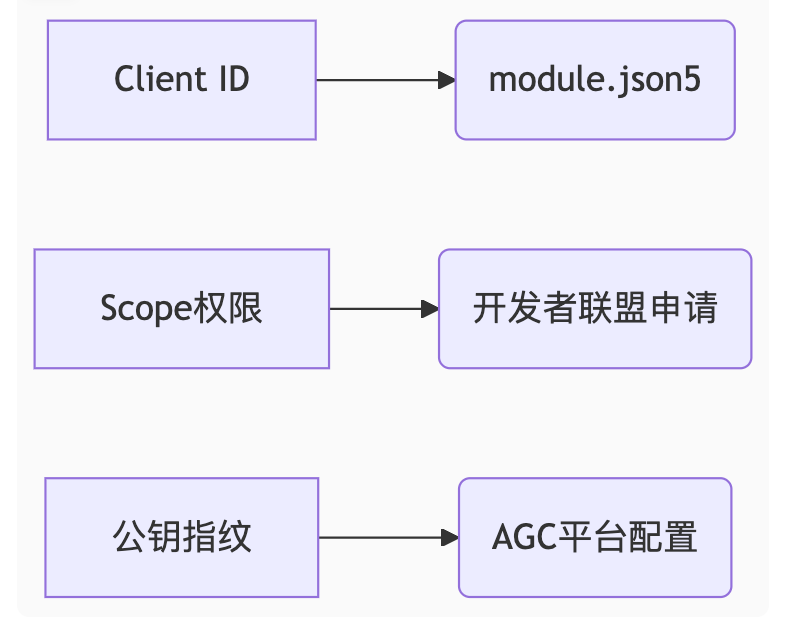
二、权限配置核心要点
1. 权限层级结构
2. 敏感权限申请流程
- 登录开发者联盟
- 进入管理中心 > API服务 > 授权管理
- 选择目标应用
- 服务选择“华为帐号服务”
- 申请PHONE权限(获取手机号)
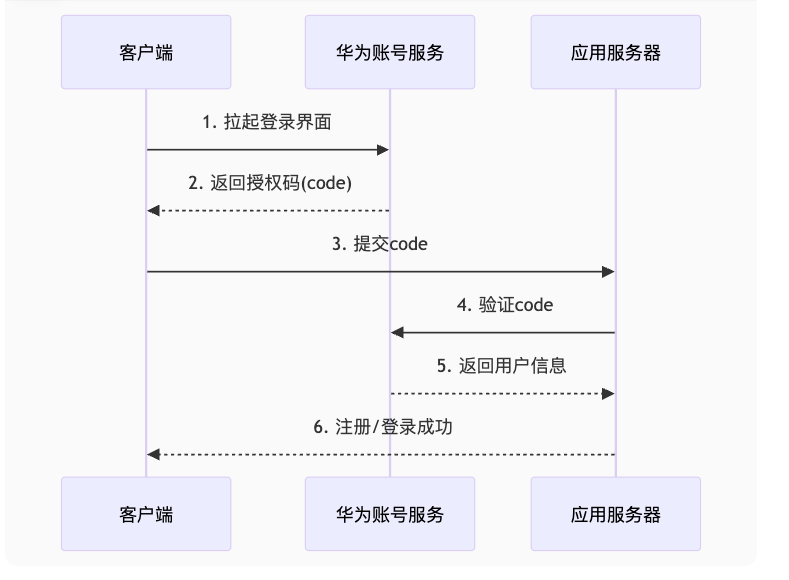
三、华为登录实现精要
1. 授权登录流程图
2. 核心代码实现
2. 关键配置项
| 文件类型 | 作用 | 获取方式 |
|---|---|---|
| .p12 | 私钥文件 | DevEco Studio生成 |
| .csr | 证书请求文件 | DevEco Studio生成 |
| .cer | 调试证书 | AGC平台申请 |
| .p7b | Profile文件 | AGC平台申请 |
签名配置示例:
// build-profile.json5
"signingConfigs": [
  {
    "name": "release",
    "material": {
      "storeFile": "meikou.p12",
      "storePassword": "******",
      "keyAlias": "meikou",
      "keyPassword": "******",
      "signAlg": "SHA256withECDSA",
      "profile": "meikou_debug.p7b",
      "certpath": "meikou.cer"
    }
  }
]
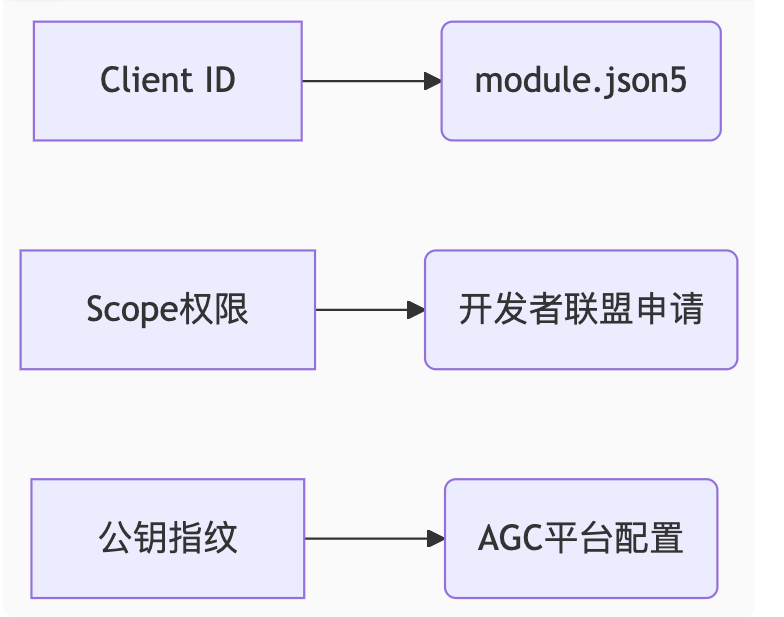
二、权限配置核心要点
1. 权限层级结构
2. 敏感权限申请流程
- 登录开发者联盟
- 进入管理中心 > API服务 > 授权管理
- 选择目标应用
- 服务选择“华为帐号服务”
- 申请PHONE权限(获取手机号)
三、华为登录实现精要
1. 授权登录流程图
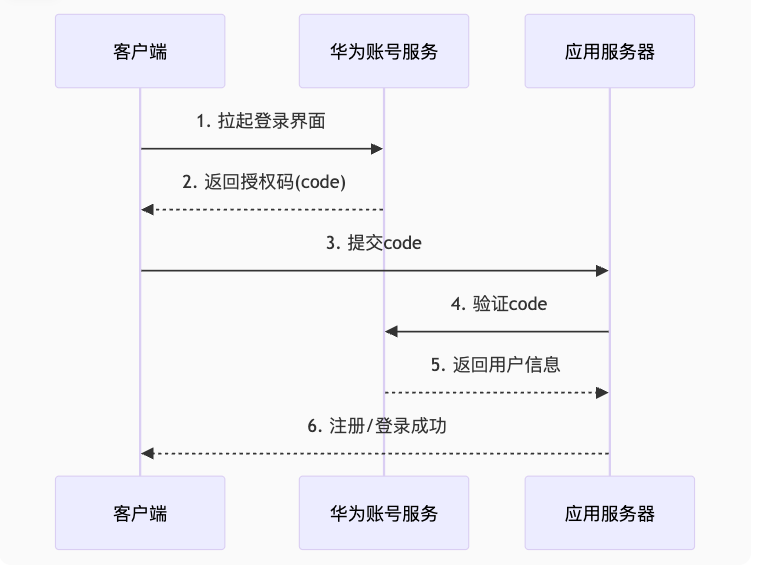
2. 核心代码实现
1. 封装登录模块:
// features/account/src/main/ets/service/HuaweiAuthService.ets
import { AccountAuthService, AccountAuthParams, AccountAuthScope } from '@ohos/account';

export class HuaweiAuth {
  static async login(context: common.UIAbilityContext): Promise<string> {
    const service: AccountAuthService = AccountAuthService.getService(context);
    const authParams: AccountAuthParams = {
      scopeList: [AccountAuthScope.SCOPE_MOBILE_NUMBER]
    };
    try {
      const result = await service.signIn(authParams);
      return result.authCode; // 获取授权码
    } catch (error) {
      throw new Error(`华为登录失败: ${error.code}`);
    }
  }

  static async logout(): Promise<void> {
    const service = AccountAuthService.getService();
    await service.cancelAuth();
  }
}
2. 登录页面整合:
// features/auth/src/main/ets/view/LoginView.ets
import { HuaweiAuth } from '../service/HuaweiAuthService';

@Entry
@Component
struct LoginPage {
  @State isLoading: boolean = false;

  async huaweiLogin() {
    this.isLoading = true;
    try {
      const code = await HuaweiAuth.login(getContext(this));
      // 提交code到应用服务器
      const userInfo = await AuthAPI.loginWithHuawei(code);
      AppStorage.setOrCreate('user', userInfo);
    } catch (error) {
      promptAction.showToast({ message: error.message });
    } finally {
      this.isLoading = false;
    }
  }

  build() {
    Column() {
      Button('华为账号登录')
        .onClick(() => this.huaweiLogin())
        .enabled(!this.isLoading)

      if (this.isLoading) {
        LoadingProgress()
          .color(Color.Blue)
      }
    }
  }
}
四、全局弹窗最佳实践
1. 官方推荐方案(API 10+)
// common/src/main/ets/component/LoadingDialog.ets
import { UIContext } from '@ohos.arkui.UIContext';

@CustomDialog
struct GlobalLoading {
  @State message: string = '处理中...'
  controller: CustomDialogController

  build() {
    Column() {
      LoadingProgress()
        .width(50).height(50)
      Text(this.message)
        .margin({ top: 10 })
    }
    .padding(20)
  }
}

// 全局弹窗管理器
export class DialogUtils {
  static showLoading(message: string = '') {
    const controller: CustomDialogController = new CustomDialogController({
      builder: GlobalLoading({ message }),
      alignment: DialogAlignment.Center,
      customStyle: true
    });
    controller.open();
    return controller;
  }
}
2. 使用示例
// 登录流程优化
async huaweiLogin() {
  const controller = DialogUtils.showLoading('华为登录中');

  try {
    const code = await HuaweiAuth.login(getContext(this));
    // ...后续处理
  } catch (error) {
    // 错误处理
  } finally {
    controller.close();
  }
}
五、登出逻辑强化
// features/user/src/main/ets/view/SettingView.ets
async logout() {
  try {
    // 同步执行本地登出和华为登出
    await Promise.all([
      AuthService.localLogout(),
      HuaweiAuth.logout()
    ]);
    router.clear();
    router.pushUrl({ url: 'pages/Login' });
  } catch (error) {
    promptAction.showToast({ message: '登出失败' });
  }
}
六、常见问题解决方案
| 问题现象 | 原因 | 解决方案 |
|---|---|---|
错误码6003 | 未配置Client ID | 检查module.json5的metaData配置 |
| 权限申请失败 | 企业资质问题 | 1. 完善申请材料 |
| 真机调试失败 | Profile未包含设备 | 1. 重新申请Profile |
| 弹窗不显示 | 上下文错误 | 使用getContext获取正确上下文 |
七、安全增强措施
- Code有效期:授权码10分钟内有效,需快速提交服务器
- 防重放攻击:服务器端验证code使用状态
- 敏感信息保护:// 加密存储token import { cryptoFramework } from '@ohos.security.cryptoFramework'; async function secureStore(token: string) { const cipher = await cryptoFramework.createCipher('AES256|ECB'); // ...加密操作 }
八、面试要点总结
- 封装组件经验:华为登录模块:封装认证逻辑与UI解耦全局弹窗:基于CustomDialogController实现安全存储:结合cryptoFramework加密敏感数据
- 关键技术选择:
- 性能优化:并行操作:登出时同步执行本地和云端登出资源复用:DialogController单例管理错误边界:try/catch包裹异步操作
©本站发布的所有内容,包括但不限于文字、图片、音频、视频、图表、标志、标识、广告、商标、商号、域名、软件、程序等,除特别标明外,均来源于网络或用户投稿,版权归原作者或原出处所有。我们致力于保护原作者版权,若涉及版权问题,请及时联系我们进行处理。
分类
HarmonyOS
标签
HarmonyOS
K老师
华为登录
暂无评论数据
发布
相关推荐
你的手势冲突解决了吗?鸿蒙事件拦截机制全解析
 威哥爱编程
威哥爱编程 8555
8555 0
0你的鸿蒙 APP 包为啥这么大?资源瘦身终极方案,立减 30%
威哥爱编程 8226 0微信鸿蒙版App热更新:拍照功能弃用华为原生相机 改用自带页面引关注
 老李的控制台 10466 0
华为鸿蒙 HarmonyOS 6 沉浸光感视效设计细节公开
智慧的键盘侠 10522 0 K老师
大家好我是K老师,这是我的个人介绍:鸿蒙先锋,鸿蒙开发者达人,鸿蒙应用架构师,HDG组织者,可0-1开发纯血鸿蒙应用,可0-1开发前端加鸿蒙混合应用,可0-1开发PC端鸿蒙应用。
65
帖子
0
提问
1412
粉丝
最新发布
[HarmonyOS][K老师]HarmonyOS 语音生成(Speech Production)、文本朗读(TextReader)、AI 字幕(AICaptio),架构设计、开发流程、场景适配及优化策略。
2026-01-16 14:38:12 发布[HarmonyOS][K老师]【人脸比对】【faceComparator】Core Vision人脸比对器API的详细说明。
2026-01-12 14:39:01 发布热门推荐
0 回复 829 浏览
0 回复 4324 浏览
0 回复 3841 浏览
0 回复 3403 浏览
相关问题